Choose a template
Pick the site built for your trade, or a design family you like the look of.

Web Builder
Start from an industry template, drag sections into place, add your logo and colors, and publish on your own domain.
Drag, drop, brand, publish
The problem
The site was built years ago by someone who no longer answers. Changing a phone number takes a week, and the photos are from three trucks ago.


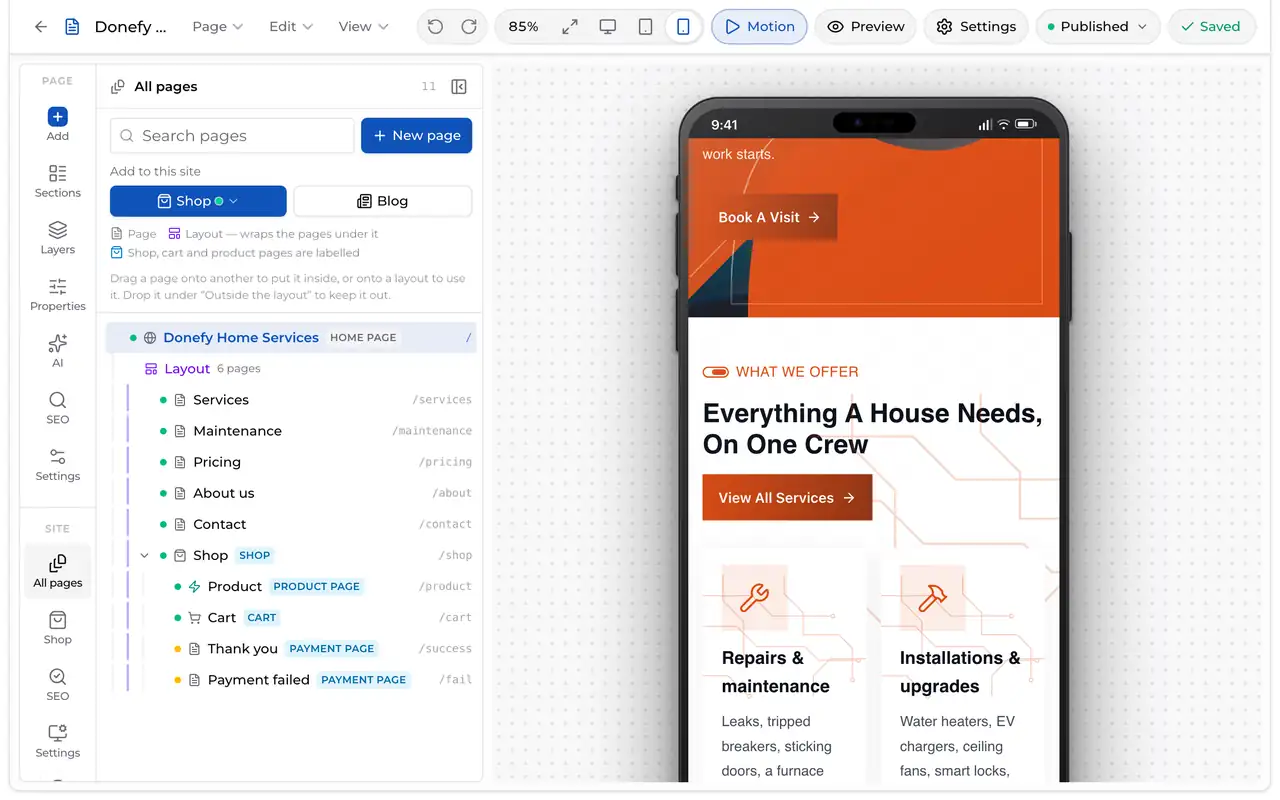
The editor
Your page sits in the editor with every section listed beside it.
Pick a section and its words, links and photos open, ready to change.
Switch to tablet and phone to see the page the way customers will.
All pages shows the whole site: services, pricing, about, contact and the shop.
The real product

How it works
Pick the site built for your trade, or a design family you like the look of.
Swap in your logo, colors, words and photos. Add a landing page, a blog or an online store when you want one.
Verify your domain and the site goes live on it, with its security certificate.
AI inside
The Assistant in the editor works on a whole page or on a single element.
Ask for a page or a change in plain words. Attach reference images and it works from them.
AI proposes the pages your site needs and asks questions where it is unsure.
It suggests a title, a description and image text for search, written only from what is on your published page.

Donefy. Done for you.
More of the Business Operating System