Pick a template
Choose the template for your trade. Your logo, your terms and your pricing are already in it.

Proposals
Start from an industry template, price the job with your adders and financing, and send a proposal your customer can sign.
Build, send, track
The problem
A quote typed at midnight, a file nobody opens, a price that changes on the phone. Customers go with the company that shows up first with something they understand.


One document
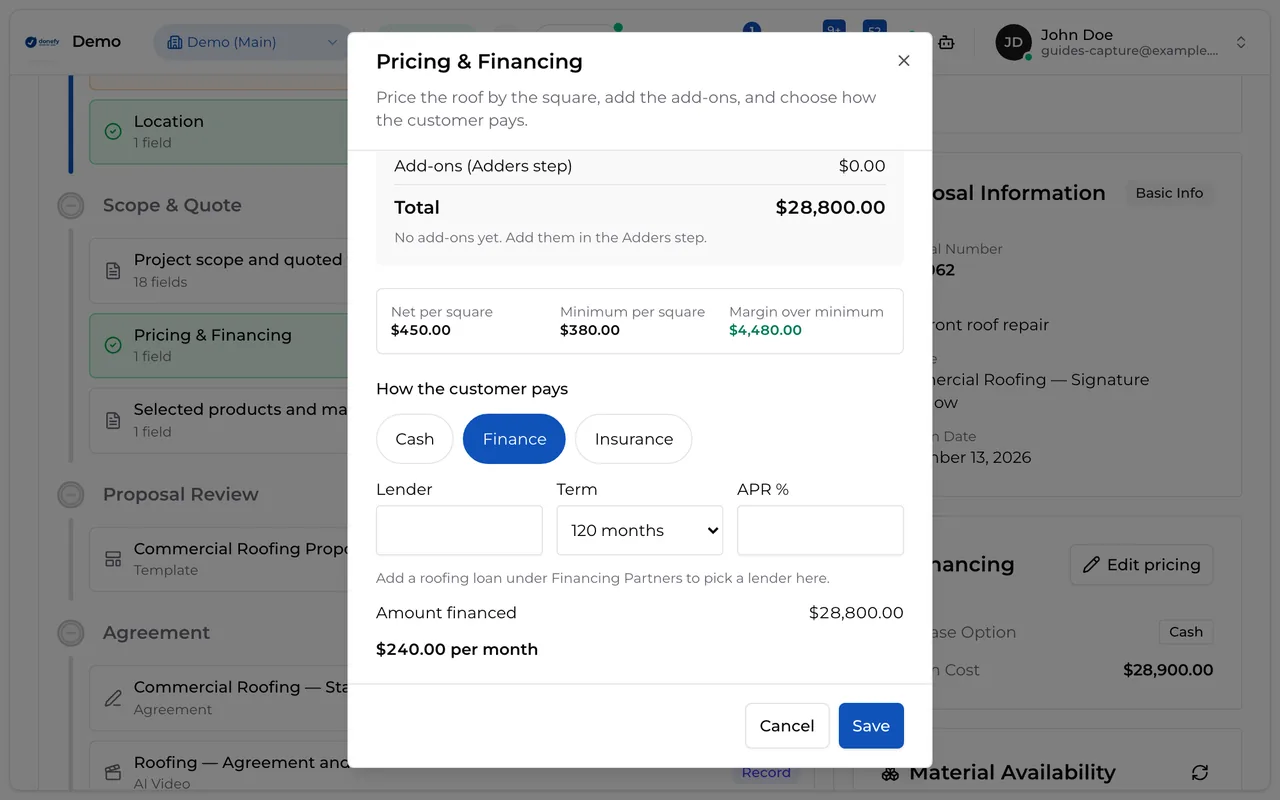
The proposal moves through its pipeline steps, and Pricing & Financing is next.
Enter the squares and the price per square, and the total adds itself up.
Net price, your minimum and the margin over it show before anything is sent.
Pick how the customer pays: finance with a monthly payment, insurance with a deductible, or cash.
The real product

How it works
Choose the template for your trade. Your logo, your terms and your pricing are already in it.
Add the work and the adders, and choose how the customer will pay. The totals follow.
Share the proposal by link or text message. Your customer reads it on any screen and signs the agreement from it.
AI inside
Pricing follows your rules. AI handles the explaining, the paperwork and the questions.
Add an AI Video Flow step and your customer gets an avatar video. Describe a scene and AI writes it.
Add a capture step and AI reads the documents your customer uploads, then fills in the fields you asked for.
Ask the Assistant about the proposal you have open. It answers only from your own records.

Donefy. Done for you.
More of the Business Operating System