Bid Pursuits: a list of tracked bids by stage on the left and one pursuit open with its value, bid due date and estimating checklist

Construction bid software

Find the bids worth winning.

A feed of commercial, industrial and government bids scored against your company profile, every pursuit tracked from first look to award, and subcontractor quotes leveled line by line.

  • Scored bid feedMatched to your profile
  • Pursuits by stageWatching to won
  • Bid levelingQuotes on equal scope

This is Bidhub itself, not a mockup.

The problem

You hear about the job after the bid closed.

Bids are scattered across agency sites, plan rooms and your inbox. Someone spends the morning looking, and your estimator still ends up pricing the wrong ones.

  1. Hours spent just looking

    Someone checks the same procurement sites every morning, and the one job that fit your trade was posted on a site nobody opened.

  2. Pricing jobs you cannot win

    Your estimator spends days on a bid, then finds the bond requirement or the drive time buried deep in the specs.

  3. Sub quotes that do not match

    Three quotes come in for the same trade. One leaves out part of the scope, so the lowest number is not the lowest price.

How Bidhub fixes it

Bidhub brings the bids to you already scored against your company, keeps every pursuit and its checklist in one place, and levels sub quotes on equal scope before you pick a number.

Inside Bidhub

From the bid feed to the bid you submit.

Four screens between hearing about a job and pricing it.

See the fit before you read the specs.

Each bid shows its fit score, value, city and distance. Open one for the Go / No-Go advisor, which lists why it fits: your trades, the CSI divisions in scope, the distance from your yard and the job size. Search, sort by best fit, or narrow by role, sector and CSI division.
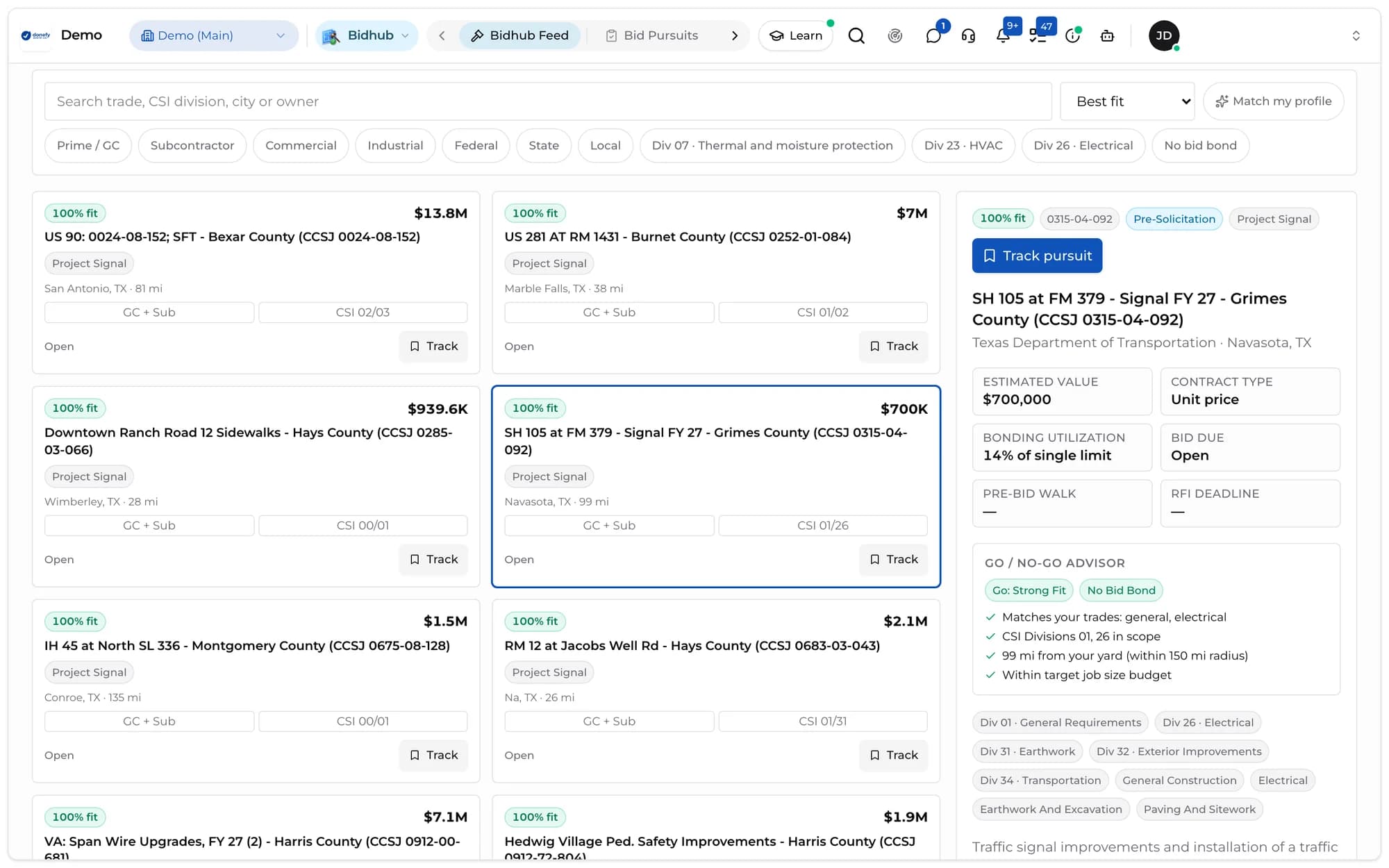
The Bidhub Feed: bid cards with a fit score, value, city and distance, and one bid open with the Go / No-Go advisor
Bidhub Feed

Every bid you chase, in one place.

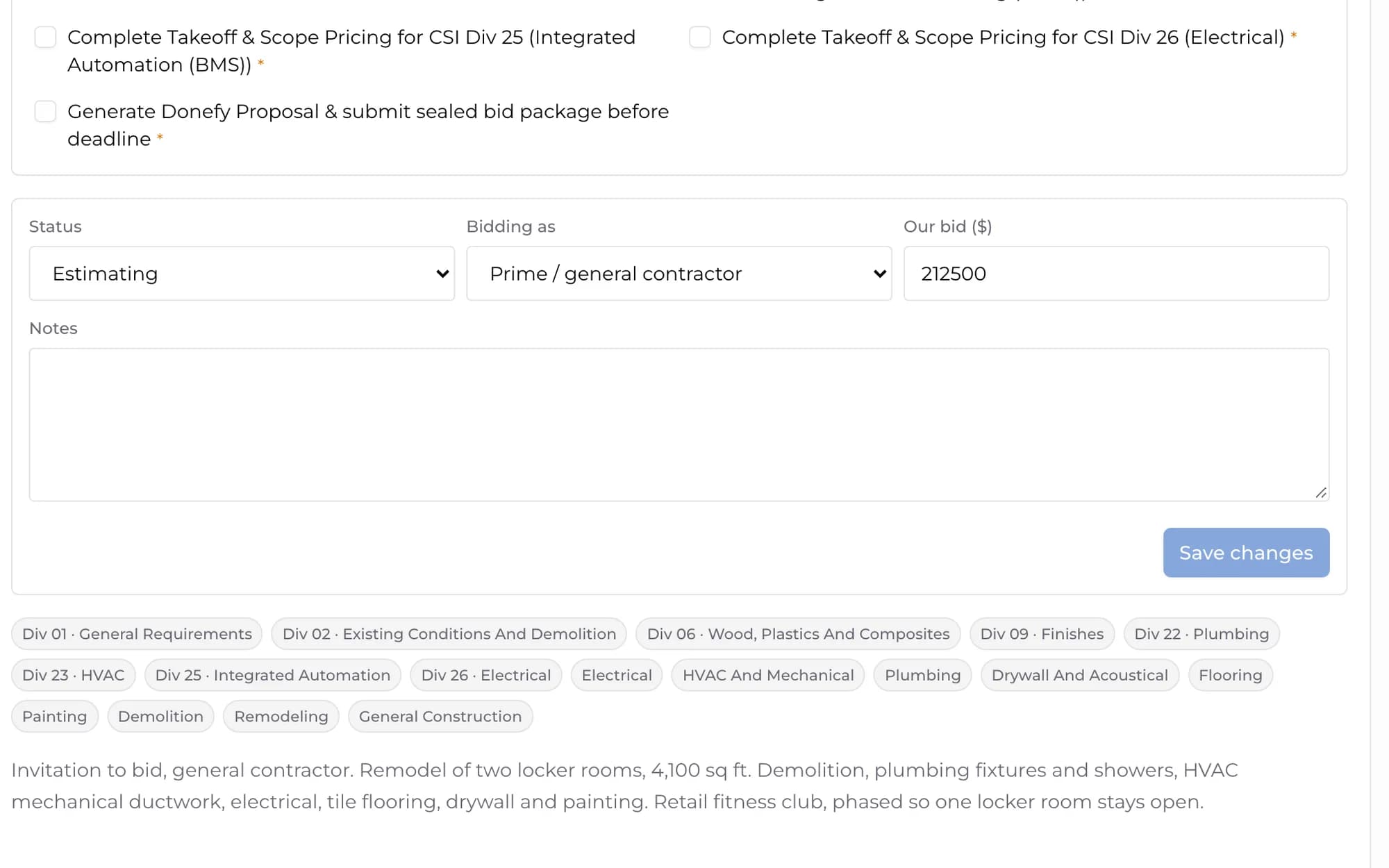
Track a bid and it becomes a pursuit with a stage, the role you are bidding as, your bid amount and notes. Its CSI divisions, trades and scope summary stay beside the estimating and compliance checklist.

A pursuit's lower half: status, the role you are bidding as, your bid amount, notes, CSI divisions and the scope summary
Bid Pursuits

Paste the invitation, get a pursuit.

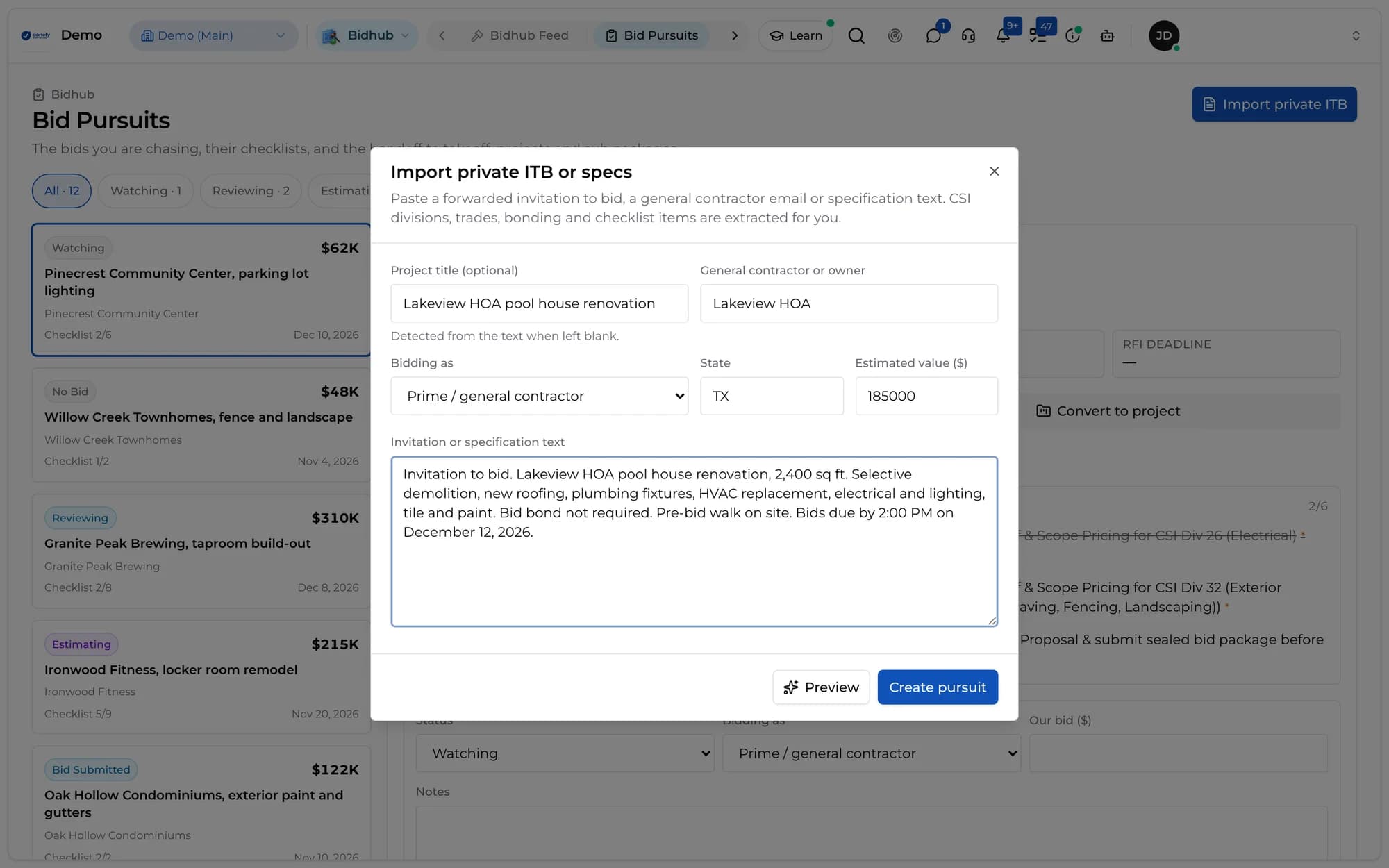
Paste a forwarded invitation to bid, a general contractor email or specification text. CSI divisions, trades, bonding and checklist items are extracted for you, and the private bid joins your pursuits.

The Import private ITB or specs dialog with a project title, owner, estimated value and the pasted invitation text
Import private ITB

Hear about the right bids first.

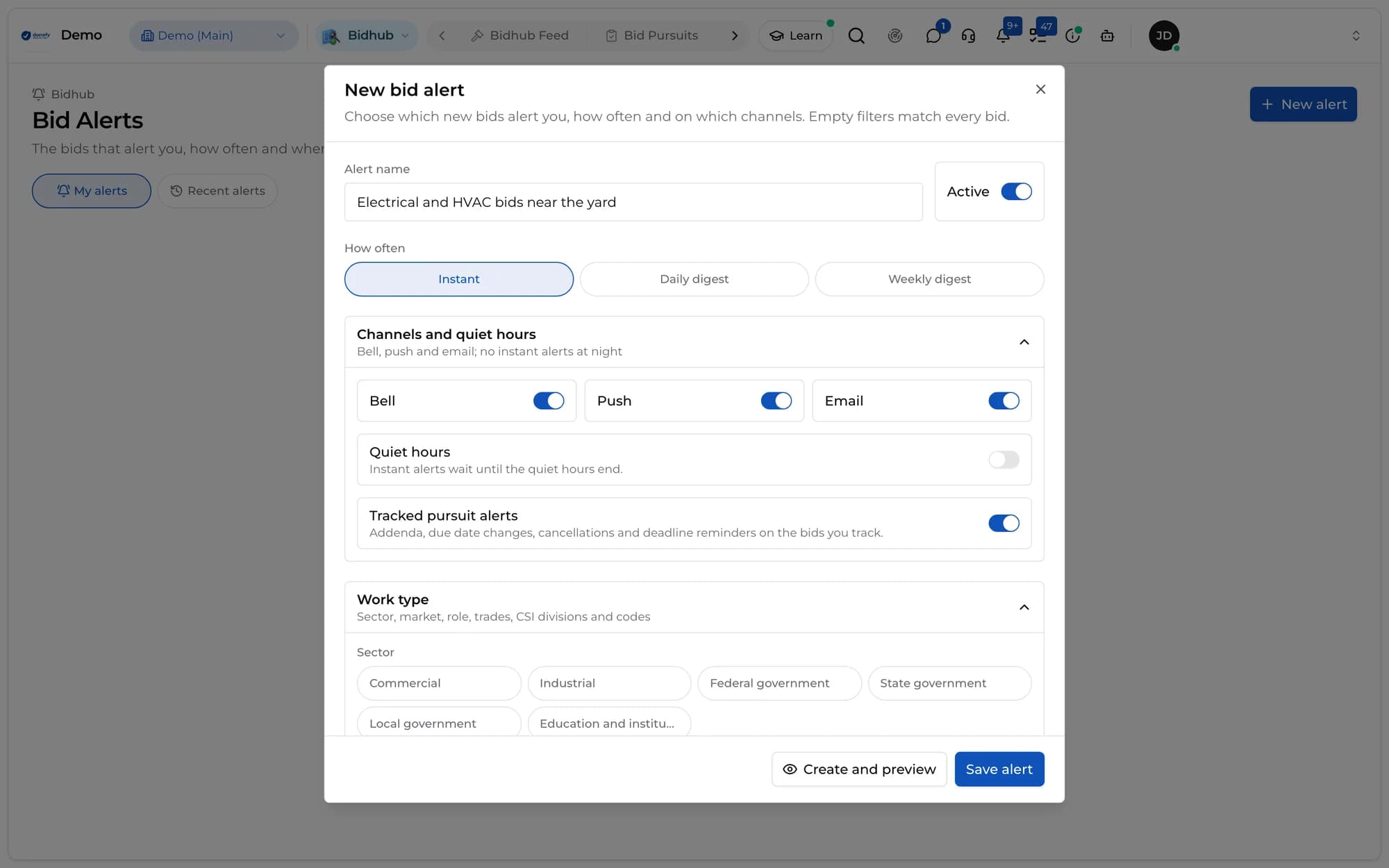
An alert has its own filters for work type and area. Choose instant, a daily digest or a weekly digest, and the bell, push and email channels. Tracked pursuit alerts cover addenda, due date changes, cancellations and deadline reminders.

The New bid alert dialog: instant or digest, bell, push and email channels, quiet hours, tracked pursuit alerts and work type filters
Bid Alerts

AI inside Bidhub

The searching and the first read are done before you sit down.

Bidhub works in the background so your estimator starts from the scope, not from a search box. The go or no-go call stays with you.

  • Read the notice for you

    New and changed notices are read by AI, which pulls out the trades, CSI divisions, bonding, set-asides and pre-bid meeting and writes a short scope summary. You know what the job is before you open the documents.

  • Search the web every day

    Once a day, AI searches the web for bid notices in the areas Bidhub covers and adds the ones it can confirm to the feed. Nobody has to make the morning round of sites.

  • Ask the Assistant how

    The Assistant in the top bar answers questions about the Bidhub screen you are on, such as how to level a trade package or set an alert, when AI Help is switched on for your workspace.

What Bidhub does

Your bid radar and preconstruction desk.

What Bidhub does from the first matching bid.

  • Fit scores

    Every bid is scored 0 to 100 against your area, role, trade, CSI division, size, bonding and certifications.

  • Go / No-Go advisor

    A plain list of why a bid fits, with bonding use and whether a bid bond is required.

  • Search and filters

    Search by trade, CSI division, city or owner, then narrow by role, sector and division.

  • Pursuits by stage

    Watching, reviewing, estimating, bid submitted, shortlisted, won, lost or no bid.

  • Checklists

    An estimating and compliance checklist on every pursuit, ticked off as you price each division.

  • Private ITB import

    Paste an invitation to bid or specification text and keep it beside the public bids you track.

  • Bid alerts

    Instant, daily or weekly, by bell, push and email, with quiet hours.

  • Bid leveling

    Trade packages by CSI division, logged quotes, plugs for excluded scope and an award.

  • Profile and seats

    One company profile for roles, sectors, trades, CSI divisions and service radius, and seats for the people who bid.

Every screen in Bidhub

  • Bidhub Feed
  • Bid Pursuits
  • Bid Leveling & ITBs
  • Bidhub Profile & Seats
  • Bid Alerts
  • Permissions

Questions

What teams ask first.

Bidhub pulls federal solicitations, state, local and school district solicitations, and commercial and industrial permit signals on a daily schedule, then scores each one against your Bidhub profile.

Yes. Import private ITB takes the invitation or specification text you paste and creates a pursuit, marked Private ITB, next to the public bids you track.

By bell, push and email. Each alert is instant, a daily digest or a weekly digest, and quiet hours hold instant alerts until they end.

Yes. Bid Leveling and ITBs keeps a trade package per CSI division. Log each quote and Bidhub shows the base bid, plugs for excluded scope, the leveled total and the difference from your estimate.

Yes. Bidhub is in the Donefy app as well as in the browser.

Stop hunting for bids. Start winning them.

The right bids, every pursuit and every sub quote, in the same place as the rest of your business.